
Lighting
Choosing between Lutron HomeWorks & RadioRA 3
Feb
When a client has a new project for us to design, the first question to be answered is usually, “Should we do HomeWorks or RadioRA 3?” This is the logic I use to answer that question.
Both are excellent residential lighting control systems from Lutron, but they serve different needs. HomeWorks is Lutron’s flagship system with the most capabilities, whereas RadioRA 3 offers a subset of those features at a lower cost. If budget were no object, HomeWorks is the right choice for every home – there’s nothing RadioRA 3 can do that HomeWorks can’t, and HomeWorks is the more robust platform. However, in reality cost is a factor, and RadioRA 3 can provide fantastic lighting control in a more affordable package.
This guide will walk you through the key considerations – cost, feature differences (keypads, lighting options, etc.), programming capabilities, integration options, and advanced features like Lutron’s Natural Show – to help you decide which system best fits your project. We’ll also include real-world examples and a side-by-side comparison table of RadioRA 3 vs. HomeWorks features.
If you have a new project in the United States, please consider us for design and deployment. We will guide you through the decision making process, and deliver a robust system tailored directly to your needs. Start the process here.
Radio RA3 & HomeWorks Cost Difference
Cost is often the deciding factor between RadioRA 3 and HomeWorks. HomeWorks is a premium system and, on average, it comes at roughly a 50% higher cost compared to a functionally equivalent RadioRA 3 setup. For example, imagine a 4,500 square-foot house needing around 100 controlled lighting circuits (dimmers/switches). A RadioRA 3 system for such a home might cost on the order of $20,000, whereas a comparable HomeWorks system could be around $30,000. This is a significant difference. So ask yourself: Are HomeWorks’ extra features worth the price premium for this project?
A practical way to approach the decision is:
- Do you need any feature that only HomeWorks can provide? If yes, then HomeWorks is the clear choice.
- If not, then are the sum of HomeWorks’ benefits worth the additional cost?
The best way to get an exact price for your Lutron RadioRA3 or HomeWorks project is to submit your plans to our team.
Key Differences in Features and Capabilities
Keypad Styles and Controls
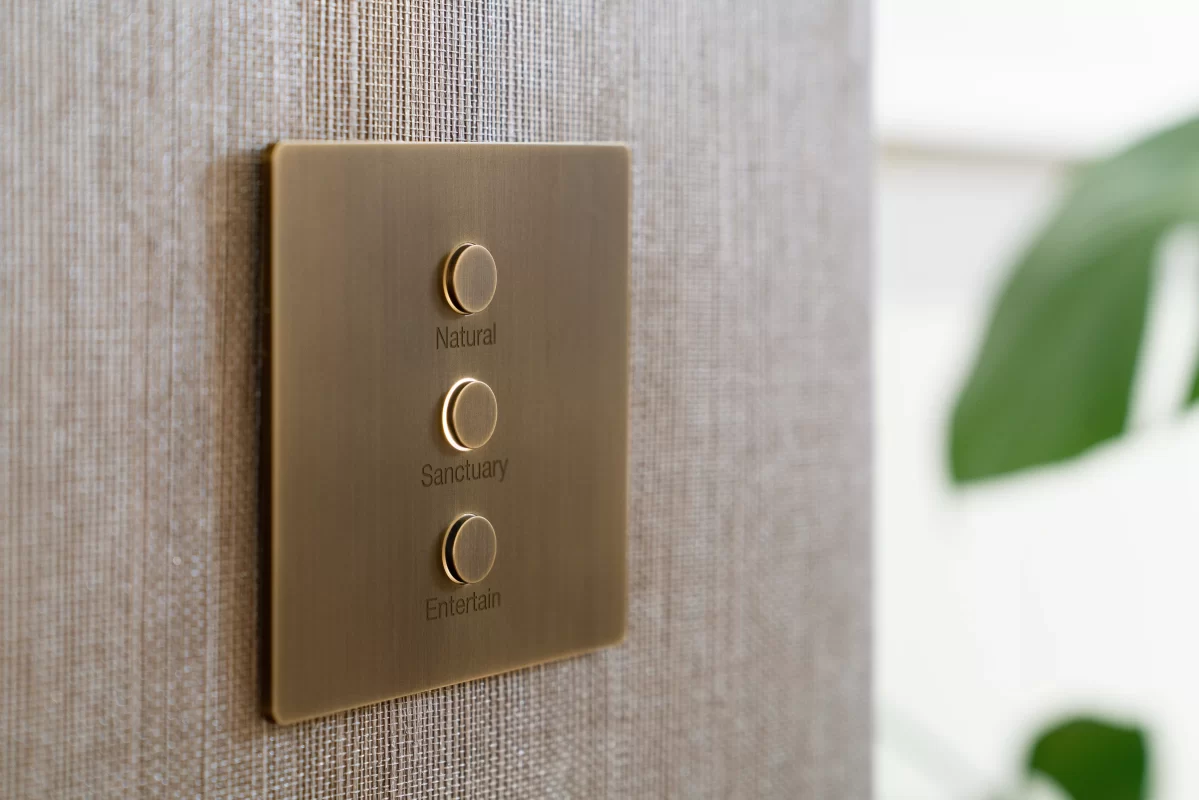
HomeWorks supports Lutron’s designer keypad lines — including Alisse, Avienna, and Palladiom keypads — which offer premium aesthetics. RadioRA 3 is limited to the Sunnata RF keypads and dimmers. If you want high-end finishes and custom layouts, HomeWorks is the better choice.
Lighting Fixture Compatibility
HomeWorks supports advanced lighting fixtures like Ketra and Rania, offering full-spectrum and natural white tunable lighting. RadioRA 3 supports Lumaris tunable white fixtures but lacks native support for Ketra and Rania.
Shades and Other Device Support
HomeWorks integrates both wireless and wired Lutron shade systems. RadioRA 3 supports only wireless shades. For complex shading needs or wired installations, HomeWorks is the better fit.
Advanced Programming & Customization
HomeWorks offers advanced features like Natural Show (circadian lighting), conditional logic, sequence programming, and press/hold dimming. RadioRA 3 supports basic scenes and schedules but lacks these advanced capabilities.
Integration with Other Systems
HomeWorks supports deep integration with automation and AV systems using Telnet, RS-232, and IP protocols. RadioRA 3 supports basic integration via Lutron’s LEAP API and works well with voice assistants.
System Size and Scalability
RadioRA 3 is ideal for small-to-medium homes and retrofits. HomeWorks scales to large estates and supports centralized panelized lighting, reducing wall clutter and increasing design flexibility.
RadioRA 3 vs HomeWorks Feature Comparison
| Aspect | Lutron RadioRA 3 | Lutron HomeWorks |
|---|---|---|
| Typical Use Case | Small to medium homes, retrofits | Large homes, estates, new construction |
| Approx. Cost | ~$20,000 (example) | ~$30,000 (example), ~50% more expensive |
| Wall Controls | Sunnata keypads only | Sunnata + Alisse, Palladiom, Aviena keypads |
| Lighting Compatibility | Standard LEDs, Lumaris tunable white | Ketra, Rania, Lumaris full support |
| Shade Integration | Wireless shades only | Wireless + wired shades |
| Programming Features | Basic scenes and schedules | Advanced logic, sequences, press/hold dimming |
| Circadian Lighting | Not available | Natural Show (dynamic circadian lighting) |
| Integration | Voice assistants, basic smart home platforms | Full integration (Telnet, RS-232, IP, AV, automation) |
| System Architecture | Wireless only | Wireless + panelized lighting |
| Max Capacity | ~200 devices* | Hundreds to thousands of devices |
| Programming Complexity | Simpler, less labor-intensive | Complex, highly customizable |
Making the Decision
Choose HomeWorks if you:
- Want designer keypads and premium aesthetics
- Plan to use Ketra or Rania tunable lighting
- Need advanced programming or integration
- Are building a large or complex home
- Want centralized lighting with minimal wall clutter
Choose RadioRA 3 if you:
- Are retrofitting an existing home
- Want reliable lighting control at a lower cost
- Don’t need advanced features or designer keypads
- Are working on a small-to-medium home
Both systems are excellent. The right choice depends on your project’s size, budget, and feature requirements. By understanding the differences outlined above, you can confidently select the system that will best light your home.

